
Draws a new cell in the document. Optionally this cell can be provided with a frame, a background and a text. The left/upper position of the cell corresponds to the current position within the document. Containing text can be aligned or centered. After creating the cell, the current position moves to the right (corresponding to the cell width) or to the beginning of the next row. A text containing the cell can optionally be linked. If the automatic page break is activated and the cell would exceed the bottom of the page, a page break is performed before the cell is output.
Syntax
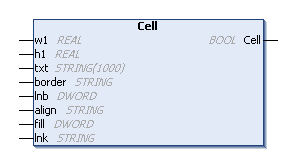
METHOD PUBLIC Cell : BOOL
VAR_INPUT
    w: REAL;
    h : REAL;
    txt : STRING;
    border : STRING;
    lnb : DWORD;
    align : STRING;
    fill : DWORD;
    lnk : STRING;
END_VAR
Parameters
|
Parameter |
Description |
|---|---|
|
w |
Width of the cell. If the value is 0, the width of the cell corresponds to the space remaining from the current horizontal position (X axis) to the right margin. |
|
h |
Height of the cell. Standard cell height 0. |
|
txt |
Text to be output in the cell. An empty character string by default. |
|
border |
Specifies whether a frame should be drawn around the cell. The value can be both a number:
or a string consisting of one or more of the following characters (the order is not to be observed):
|
|
lnb |
Specifies where the current position should be after the output of the cell. Possible values for this are:
By default, the value 0 is used to set the current position to the right of the cell. |
|
align |
Can be used to align or center the text in the cell. Possible values for alignment are (case insensitive):
|
|
fill |
Specifies whether the cell background should be filled (1) or transparent (0). If the cell background is to be filled, the color previously defined with SetFillColor() is used. By default, the cell background is kept transparent. |
|
lnk |
URL or the identifier of a link that was previously added to the document with AddLink(). |
|
Return value |
Status of the call |
Example
Requirements