
The recommended watchdog and error handling in the CODESYS application is described here and how to bring the system into a safe state and restart it.
If one of the iec tasks in Codesys freezes or a application exception, will not lead to a process hang or a PLC reboot, respectively, the controller will continue to work, the program will generate diagnostic information and the application and its child applications are all halted.
In this way, all tasks of the affected applications are also halted.
To reset the plc in case of a error, active enhancements are needed in the code and project.
Description
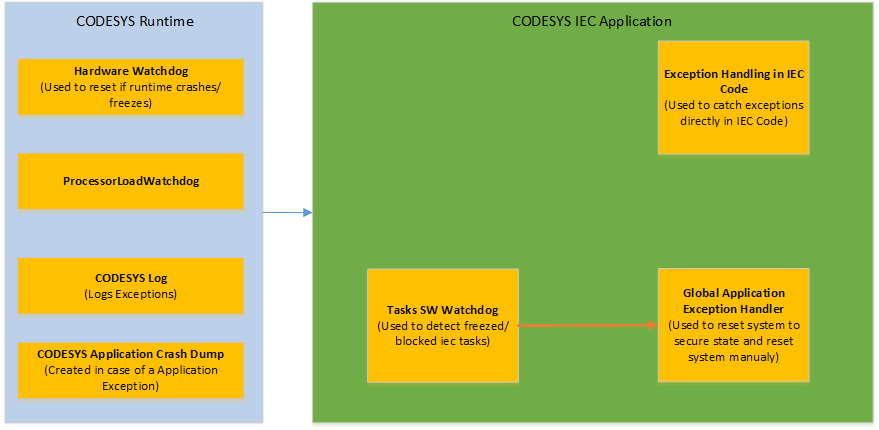
Behaviour
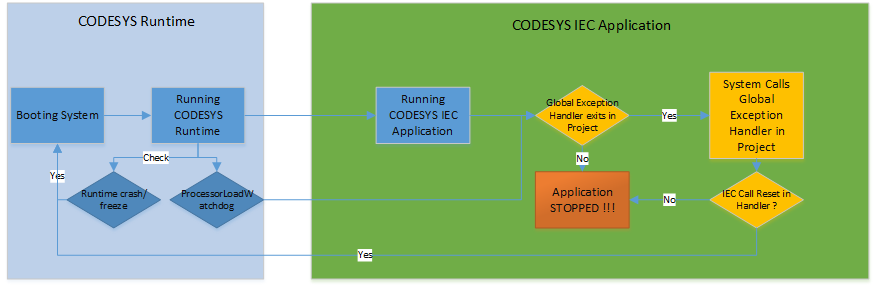
System Error Handling
Hardware Watchdog
The codesys runtime automatically triggers the hardware watchdog of the system and triggers a reset itself if the runtime crashes or freezes.
No setting or code is required for this.
ProcessorLoadWatchdog
The ProcessorLoadWatchdog function measures the PLC load cyclically and generates an exception if the limit is exceeded.
This exception can be evaluated in the IEC EventHandler.
This feature can be set or disabled in the Webconfig.
This function is disabled by default.
How is the ProcessorLoad calculated exactly ?
For this a task is started per processor core (ProcessorLoadn with n=processor number), which are created by the priority directly under the IEC tasks. These tasks measure, if they come at all, the load of the processor, i.e. here the time, when processor load tasks are active. If they don't get to it at all, they assume a load of 100%.
This also means that non-IEC tasks that have a higher priority can influence this measurement.
Also other applications using the same core, can influence the measurement.
Is there anything here that we have not considered ?
As you can see the procedure is quite imprecise and should prevent you from being locked out of the system by a wrongly programmed IEC task and was mainly introduced for single processor systems long before MultiCore support.
Better and more accurate is to use the watchdog for the IEC tasks instead, which is set with Task Configuration and deactivate the ProcessorLoadWatchdog.
It is also rather hard to find out why the ProcessorLoad Watchdog triggers.
Typically this can occur in the startup phase of the IEC application or when a Visu is used in the project.
Also other applications using the same core, can influence the measurement.
This function can be activated during the development phase of the project to avoid being locked out of the development environment.
In all other cases it is recommended to disable this function.
CODESYS Log
All codesys errors and iec application errors are automatically stored in the log.
The codesys log can be viewed in the webconfig or in the codesys ide.
No setting or code is required for this.
CODESYS Application Crash Dump
If an exception is raised in the IEC application, for example division by 0, writing out of memory, triggering a sw watchdog, etc., a crash dump is generated.
The crash dump can be evaluated in the codesys ide.
No setting or code is required for this.
IEC Application Error Handling (Active Configuration and IEC Code required)
Tasks Software Watchdog
All created iec tasks in the codesys application are not automatically monitored if they block.
This function must be activated explicitly for each task in the task configuration.
The task manager has a feature for tracking freezes - "Watchdog".
This function is designed to stop the execution of the program when the execution time is exceeded. So, if any of the programs runs longer than the time allotted to it, then when the Watchdog is triggered, the controller or task will not freeze.
It becomes possible to correct programs or reboot the controller.
In addition, an exception event handler must be integrated in the project so that a defined action is executed in the event of an error.
So, for example, if "Watchdog" is triggered in Codesys 2.3, then it will automatically reboot the PLC. This is done so that if an error occurs in the code, to exclude or reduce the impact of a hung PLC on the process, there is a certain chance to return everything to normal, or at least return all controller outputs to a safe state. If one of the tasks in Codesys 3.5 freezes, this will not lead to a process hang or a PLC reboot, respectively, the controller will continue to work, the program will generate diagnostic information about the task being excluded from processing and stops the application.
Global Exception Handler
For each exception that occurs in the iec application, the exception handler is called.
the exception handler then reacts to this error, for example by testing the system.
Without exception handler and active measures in the created handler, the application is simply stopped.
An exception handler can be created in the task configuration.
Exception Handling in IEC Code (try/catch)
With the feature _TRY/_CATCH blocks, it is possible to catch a exception directly in the iec code.
The program flow is not stopped, the iec instructions in the _CATCH block are processed.
The _TRY block is followed by a _CATCH block that catches all exceptions in the try block.
Best Case
Create Global Exception Handler
-
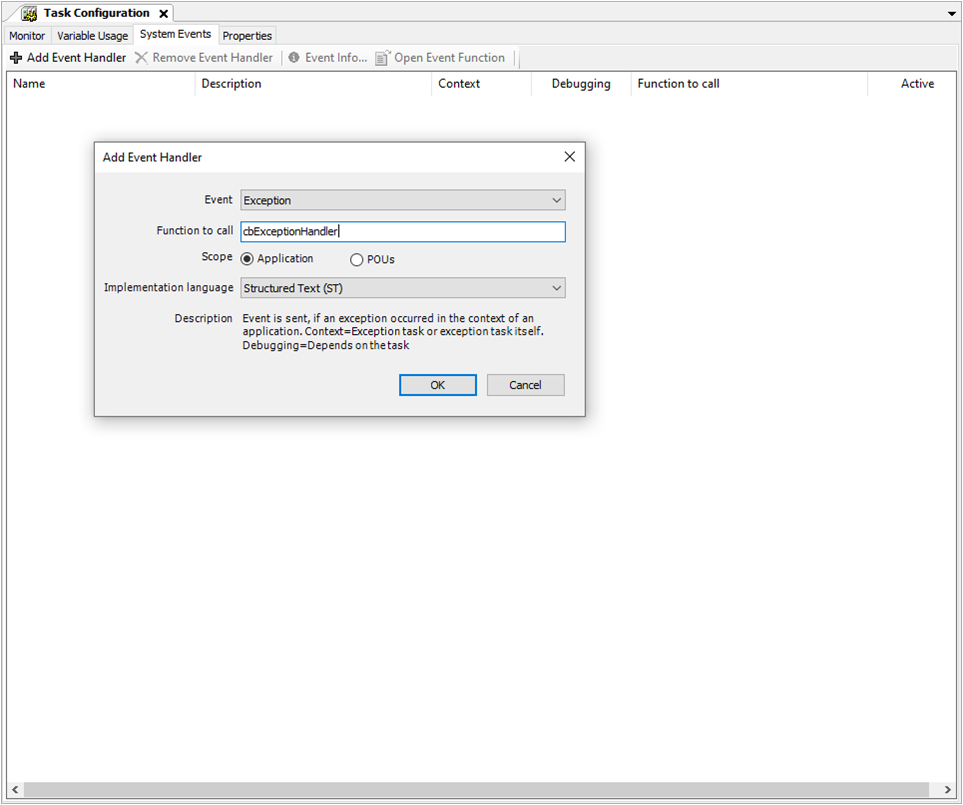
Open the System Events tab in the task configuration.
-
Add an event handler with the event "Exception", for example with the name "cbExceptionHandler".
-
-
Edit created function "cbExceptionHandler".
Content cbExceptionHandler Function:
VAR
   hDevice: DWORD;    // handle for SystemReset
END_VAR

// optional bring system to safe operational state
...

// execute SystemReset
hDevice := MnApiSystem_Open(pDevice:= 0);
MnApiSystem_SoftwareReset(hDevice:= 0);
MnApiSystem_Close(hDevice:= hDevice);
Configuration IEC Task Watchdog
-
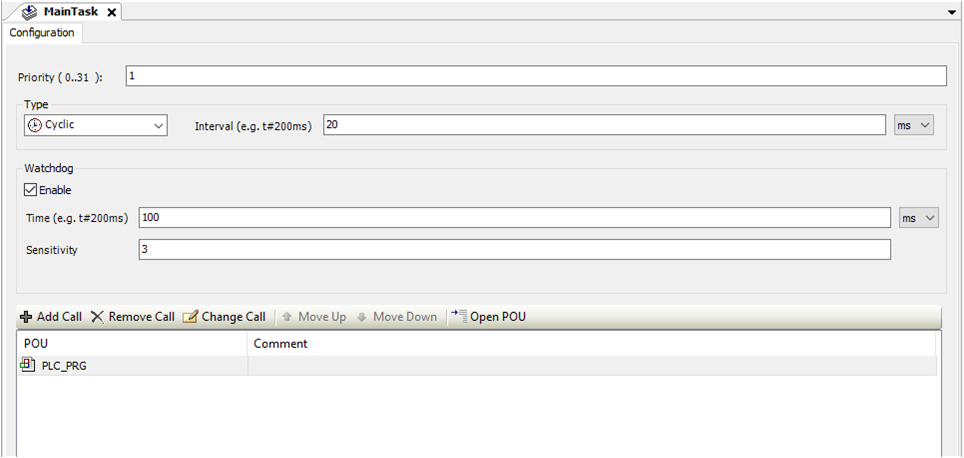
Activate Watchdog Enable for each IEC Task you want to monitor of freezes.
-
For the correct operation of the "Watchdog" timer function, there is a "Time" and "Sensitivity" parameter.
These parameters determines how many cycles the time can be exceeded before the Watchdog is triggered.
Remarks
-
The exceptions id optional used in try/catch and exception handler are defined in the library SysExcept.
-
If you activate the option Update I/Os in the PLC Settings of the PLC, then CODESYS resets the outputs to the defined default values.
-
CODESYS Help SW Watchdog: https://content.helpme-codesys.com/en/CODESYS%20Development%20System/_cds_obj_task_configuration.html
-
CODESYS Help Try/Catch: https://content.helpme-codesys.com/en/CODESYS%20Development%20System/_cds_operator_try_catch_finally_endtry.html