
Inserts an image into the current page. The position of the top/left corner of the image must be explicitly specified. You can use GetX() and GetY() to determine the current position. The image size to be used for the output can be determined in three different ways.
-
Explicit specification of the height and width of the image (in the specified unit of measurement)
-
Explicit specification of a measurement (height or width). The missing dimension is calculated using the original size while maintaining the aspect ratio.
-
No image size is specified. This generates an output of the image with 72 dpi.
The image format PNG (Portable Network Graphics) is supported with the following variants:
-
Grayscale images (8 bit, 256 grayscales)
-
colour palettes
-
Truecolor (24 bit)
not supported are:
-
Interlacing (step-by-step structure)
-
alpha channel
If color transparency is used, the information is included in the document, but the display with color transparency is only possible with Acrobat Reader 4 and higher. The underlying file format can be determined explicitly by a parameter or results from the file extension used. An image can be provided with a link. Note. If one and the same image is used several times within the document, the integration of the image into the document will nevertheless only take place once.
Syntax
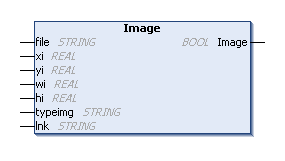
METHOD PUBLIC Image : BOOL
VAR_INPUT
    file : STRING;
    xi : REAL;
    yi : REAL;
    wi : REAL := 0;
    hi : REAL := 0;
    typeimg : STRING := '';
    lnk : STRING := '';
END_VAR
Parameters
|
Parameter |
Description |
|---|---|
|
file |
Path to the image file to be included. |
|
xi |
Horizontal position (X-axis) of the left/upper corner at which the image is to be output. |
|
yi |
Vertical position (Y-axis) of the left/upper corner at which the image is to be output. |
|
wi |
Width of the image to be output. If no width is defined or the width is set to 0, the width is automatically determined based on the height or original size specified. |
|
hi |
Height of the image to be output. If no height is defined or the height is set to 0, the height is automatically determined based on the width or original size specified. |
|
typeimg |
Underlying image format. Possible values for this are (case insensitive):
|
|
link |
URL or the identifier of a link that was previously added to the document with AddLink(). |
|
Return value |
Status of the call. |
Example
Requirements
Remarks