
Creates a new page in the document. If a page is already active, the Footer() method is called to first create the footer for the current page before the new page starts. After the new page is created, the new current position is the left/upper corner according to the defined upper and left page spacing. For the new page, the Header() method for creating the header is called last. The font used on the previous page remains valid on the new page. Line thickness and color settings are also applied to the new page. The origin for the position information is the left/upper corner of the document. Positive values for positions cause the position to be shifted downwards or to the right.
Syntax
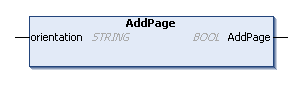
METHOD PUBLIC AddPage : BOOL
VAR_INPUT
    orientation: STRING;
END_VAR
Parameters
|
Parameter |
Description |
|---|---|
|
orientation |
Defines the page layout for the new page to be created. Possible values are (case insensitive):
|
|
Return value |
Status of the call. |
Example
Requirements