
Specifies how the document is to be displayed. In addition to the zoom factor (full screen, total window width, original size, percentage zoom factor or the default setting of the reader - according to the settings in Acrobat Reader), the page layout can be defined. You can select the page-by-page, continuous or multi-column view. By default, the display options are set to the entire window width with continuous display.
Syntax
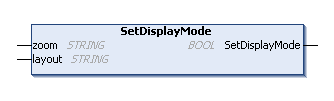
METHOD PUBLIC SetDisplayMode : BOOL
VAR_INPUT
    zoom : STRING;
    layout : STRING;
END_VAR
Parameters
|
Parameter |
Description |
|---|---|
|
zoom |
The zoom factor to be used in the display. The following character strings can be used:
|
|
layout |
Determines the layout with which the document is displayed. Possible values for this are:
|
|
Return value |
Status of the call. |
Example
Requirements
Remarks