
The Graphic button element can be used to easily create a graphic button or an animated object.

Parameters
|
Property |
Description |
|---|---|
|
Bild nicht gedrückt |
Identifier of the image file to be used for this element if the mouse is not pressed at this position. (static definition) |
|
Bild gedrückt |
Identifier of the image file to be used for this element when the mouse is pressed at this position. (static definition) |
|
Bild Inaktiv |
Identifier of the image file to be used for this element when the Input Disabled property is set. (static definition) |
|
Transparenz |
If activated, the color specified in the 'Transparent color' property (see below) is displayed transparently. |
|
Transparenzfarbe |
The button opens the color selection dialog for selecting a color that should be displayed transparent if the option "Transparent" (see above) is activated. |
|
Skalierung |
Definition of how the image file should react to changes in the element frame size. ISOTROPIC: The image retains its proportions, i.e. the height-width ratio is maintained even if the height and width of the element frame are changed separately. ANISOTROPIC: The image adapts to the size of the element frame, i.e. height and width can be changed independently. FIXED: The image keeps its original size even if the size of the element frame changes. This setting supports the animation. |
|
Animation Zyklus |
Frame change of the animated image in milliseconds.
|
|
Animation Schritte |
Number of frames - 1 of the image. |
|
Symbol Bild |
Parameters for an additional symbol graphic above the background. |
|
Schaltfäche Status |
Boolean variable that determines whether the element is displayed as "pressed" (TRUE) or "not pressed" (FALSE). |
|
Text Inaktiv Farbe |
Text color if the Input property is Disabled. |
Remarks
Animated Objects:
The following illustration shows how an animation takes place. Only a part of the image is shown, or the image is shifted from right to left, with a given change cycle. The image area outside the element frame is not drawn.
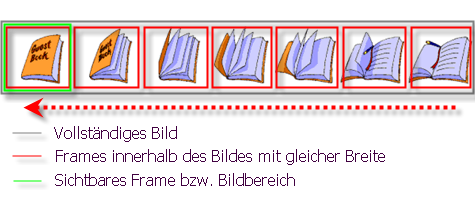
The animation is only supported with unscaled settings.