
The LiveSystem is a microSD/USB Flash drive that has an entire linux operating system on it.
This allows a user to boot into the LiveSystem operating system without having to modify anything on the main internal flash/drive.
The LiveSystem supports various functions/services such as backup, restore, swupdate and several diaganosic tools.
LiveSystem Image
URL Images: ftp://kontron_pub:WENZtA6i@ftp.kontron.ch/WebPanel/Images
|
Device (Article-Nr) |
Image Name |
LiveSystem Image Article-Nr |
Description |
|---|---|---|---|
|
11432, 11379, 11378, 11331, 11554, 11386, 11387, 11351, 11521, |
Linux WPC Live System imx6 |
00944 |
LiveSystem for imx6 Devices |
|
11414, BL/AL i.MX6UL/ULL, 11562, 11745, 11748, 11777 |
Linux WPC Live System imx6 |
00944 |
LiveSystem for imx6 Devices |
|
11542, 11592, 11593 |
Debian Live x64 Backup & Restore |
01011 |
LiveSystem for x86 Devices |
|
11589, 11590, 11591,
|
Linux WPC Live System i.MX8 |
01041 |
LiveSystem for imx8 Devices |
|
BL/AL i.MX8MM, 11766, 11771, 11783, 11802, |
Linux WPC Live System i.MX8 |
01041 |
LiveSystem for imx8 Devices |
|
|
|
|
|
Files included in the Download (zip file):
[FILE].img.gz:
The compressed image file can be copied to a memory card using an imager tool (e.g. USB Image Tool).
The image contains a partition table (MBR) with a boot partition with all necessary files from the live system.
The area between MBR (1st sector) and the boot partition is large enough to store a bootloader image.
However, the image does not contain a boot loader. This is only installed on the storage medium during the backup process or with the tool live-update-bootmedia
on the storage medium.
[FILE].livesystem.tar.gz:
The compressed archive can be extracted to a FAT formatted storage medium (memory card, USB stick). With a storage medium
the boot system cannot be installed afterwards. To boot from this storage medium, a boot system must be installed on the target device.
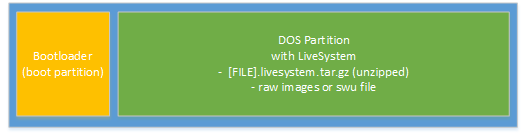
microSD or USB Stick Content
|
Content |
Description |
|---|---|
|
Image on microSD/USB Stick |
This is the content of a media (sdcard/usb stick, with [FILE].img.gz) |
|
Bootloader |
With the bootloader the device can boot independently even if the device has a corrupt or no content on the internal flash. The bootloader on the media is only supported using microSD cards. |
|
DOS Partition |
The DOS Partition of the media contains:
|
The LiveSystem Images are preconfigured
-
Boot Entry: swupdate
-
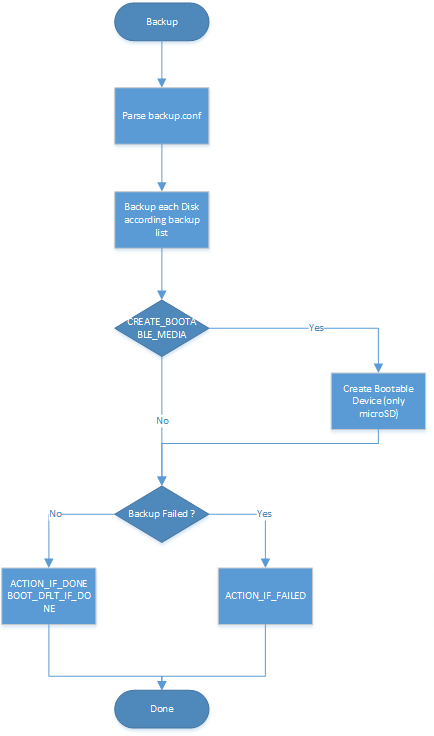
backup: backup the full system (disks, bootloader, sram)
Using the LiveSystem to Backup a Device (RAW Backup Format)
-
Download the livesystem image from the FTP server.
-
Write the livesystem image to a microSD card with the UBS Image Tool.
-
Edit the file /config/boot.conf, set line containing "BOOTENTRY" to "BOOTENTRY=backup".
-
Edit the file config/backup/backup.conf and uncomment Line "#CREATE_BOOTABLE_MEDIA=yes" and uncomment block "# sram" if you want to backup the sram on the device.
-
Power Off your Device.
-
Plug this microSD card.
-
Power On your Device.
-
Wait till backup finished (if backup was successfull device shuts down, and the microSD card boot beahviour is set to restore the backupd image to the device)
-
Remove microSD Card
-
Backup/Read your microSD card with the USB Image Tool.
Using the LiveSystem to Restore a Device with a RAW Backup
-
Write the backup image (created with RAW Backup) to a microSD card with the UBS Image Tool.
-
Edit the file /config/boot.conf, set line containing "BOOTENTRY" to "BOOTENTRY=restore".
-
Power Off your Device.
-
Plug this microSD card.
-
Power On your Device.
-
Wait till restoring finished (if restoring was successfull the device shuts down)
-
Remove microSD Card
Using the LiveSystem to Restore a Device with a SWU File (swupdate)
See: SWUPDATE
LiveSystem Functions/Services (used in Boot Config File)
backup
Create raw backup image of a device.
restore
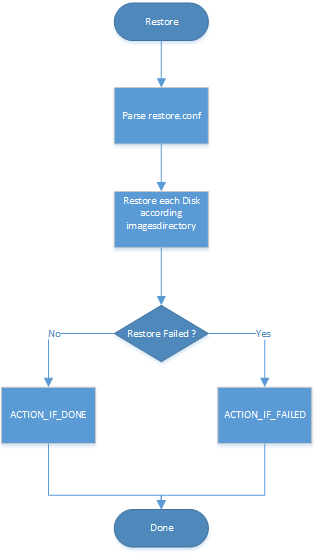
Restore a raw backup image to a device, created with the backup service.
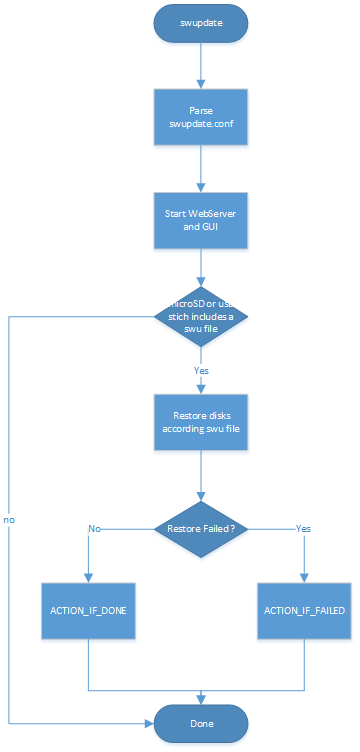
swupdate
Start swupdate server and rescuegui.
Install automatically the swu file located in the root directory of the LiveSystem disk,
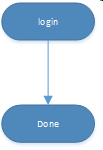
"empty"/none/default
Boot LiveSystem and wait for login.
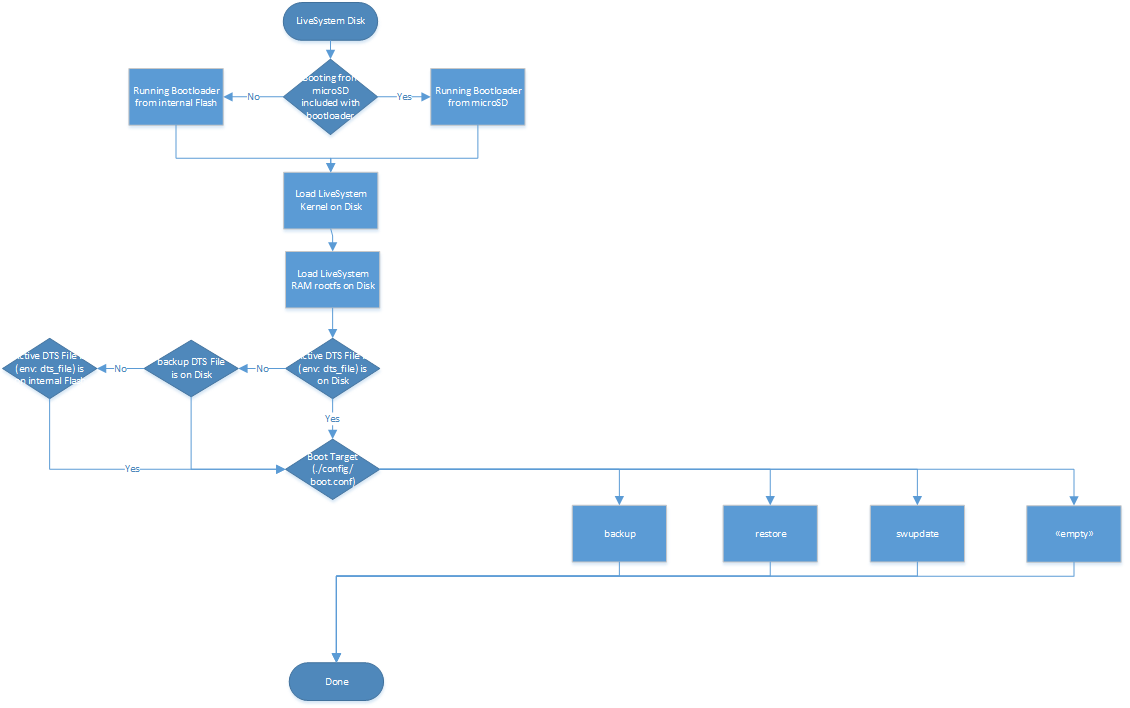
Boot/Service procedure behavior
|
Boot |
Backup |
Restore |
swupdate |
login/default |
|---|---|---|---|---|
|
|
|
|
|
|
Log Files
Log Files are automatically created in the log directory of the microSD card/USB stick
Configuration Files
The LiveSystem behavior is controlled by configuration files.
Boot
File: config/boot.conf
|
Optionname |
Description |
Default |
|---|---|---|
|
BOOTENTRY |
# swupdate: install swu file, start swupdate server and rescuegui
More information about Bootentry options below |
wait for login |
|
CONSOLE_DEVICES |
# list of linux console devices separated by spaces
|
|
|
LOGIN_DEVICES |
# space separated list of tty devices which allow login
|
no login |
|
IPCONF |
Let you specify the name(s) and the options of the interface(s) that should be configured at boot time. # IPCONF=[DEVICE]:[CLIENT_IP]:[NETMASK][:[GATEWAY_IP]:[NAMESERVER]],[,[ DEVICE]:[CLIENT_IP]:[NETMASK][:[GATEWAY_IP]:[NAMESERVER]]].. |
dhcp |
|
|
|
|
Backup (if BOOTENTRY=backup is defined)
File: config/backup/backup.conf
|
Optionname |
Description |
Default |
|---|---|---|
|
OUT_MODE |
# OUT_MODE=<channel>
|
console |
|
PSPLASH_FONT |
# PSPLASH_FONT=<font>
|
radeon |
|
PSPLASH_BG_LOGO |
# PSPLASH_BG_LOGO=<file>
|
Built-In Logo |
|
CREATE_BOOTABLE_MEDIA |
# CREATE_BOOTABLE_MEDIA=yes|no
|
no |
|
|
|
|
|
|
# *** settings for all devices *** |
|
|
BACKUP_<X>_DESC[IDX] |
# BACKUP_<X>_DESC[IDX]=DESC
|
|
|
BACKUP_<X>_DIR[IDX] |
# BACKUP_<X>_DIR[IDX]=DIR
|
|
|
BACKUP_<X>_OUTFMT[IDX] |
# BACKUP_<X>_OUTFMT[IDX]=FMT
|
|
|
BACKUP_<X>_OUTNAME[IDX] |
# BACKUP_<X>_OUTNAME[IDX]=NAME
|
|
|
BACKUP_<X>_PROGRESS_BUDGET[IDX] |
# BACKUP_<X>_PROGRESS_BUDGET[IDX]=BUDGET
|
|
|
|
# *** block devices *** |
|
|
BACKUP_BLK_DEVICE[IDX] BACKUP_BLK_DEVPATH[IDX] |
# BACKUP_BLK_DEVICE[IDX]=PATTERN
|
|
|
BACKUP_BLK_MODE[IDX] |
# BACKUP_BLK_MODE[IDX]=dd|dd-parts|partclone
# CLEAN_FREE_DISK_SPACE[IDX]=yes|no
|
|
|
|
# *** ubi images |
|
|
BACKUP_UBI_MTD_DEVICE[IDX] |
# BACKUP_UBI_MTD_DEVICE[IDX]=DEVICE
|
|
|
BACKUP_UBI_SKIP_IF_NOT_FOUND |
# BACKUP_UBI_SKIP_IF_NOT_FOUND=yes|no
|
|
|
|
# *** mtd device |
|
|
BACKUP_MTD_DEV[IDX] BACKUP_MTD_PART[IDX] |
# BACKUP_MTD_DEV[IDX]=PATTERN
|
|
|
BACKUP_MTD_SKIP_IF_NOT_FOUND |
# BACKUP_MTD_SKIP_IF_NOT_FOUND=yes|no
|
|
|
|
# *** u-boot (image and environment, i.MX6/8 only) |
|
|
BACKUP_UBOOT_DIR |
# BACKUP_UBOOT_DIR=DIR
|
|
|
|
# *** bios (only x64) *** |
|
|
BACKUP_BIOS_DIR |
# BACKUP_BIOS_DIR=DIR
|
|
|
|
|
|
Restore (if BOOTENTRY=restore is defined)
File: config/restore/restore.conf
|
Option |
Description |
Default |
|---|---|---|
|
OUT_MODE |
# OUT_MODE=<channel>
|
console |
|
PSPLASH_FONT |
# PSPLASH_FONT=<font>
|
radeon |
|
DISP_ROT |
# display rotation
|
0 |
|
PSPLASH_BG_LOGO |
# PSPLASH_BG_LOGO=<file>
|
Built-In Logo |
|
RESTORE_IMAGE_BASEDIR |
# RESTORE_IMAGE_BASEDIR=DIR
|
images folder on LiveSystem disk |
|
|
|
|
|
ACTION_IF_DONE |
# ACTION_IF_DONE=none|poweroff|displayoff|reboot[:<Entry>:<MenuId>]
|
none |
|
ACTION_IF_FAILED |
# ACTION_IF_FAILED=none|poweroff|displayoff|reboot[:<Entry>:<MenuId>]
|
|
|
BOOT_DFLT_IF_DONE |
# BOOT_DFLT_IF_DONE=<Entry>:<Timeout>:<MenuId>
Following values for Entry can be specified:
|
|
|
|
|
|
swupdate (if BOOTENTRY=swupdate is defined)
File: config/swupdate/swupdate.conf
|
Option |
Description |
Default |
|---|---|---|
|
INSTALL_RULE |
# install rule to use, possible values depend on the SWU file, usually
|
stable,complete |
|
BORDINFO |
# use this board name and hardware revision to check hw compatibility
Board Info Variables: imx6ul/ull: BORDINFO="KCH-ktn-imx6ul-imx6ull:1.0" imx6: BORDINFO="KCH-40099086:1.0" imx8mm WPC: BORDINFO="KCH-11555:1.0" imx8mm-som: BORDINFO="KCH-ktn-mx8mm-som:1.0" |
-- |
|
PUBLIC_KEYFILE |
# public keyfile to use to check swu signature
|
-- |
|
DOWNLOAD_CMD |
# swupdate downloader client command string
|
-- |
|
WEBSERVER_PORT |
# swupdate webserver port
|
8081 |
|
ACTION_ON_SUCCESS |
# action to perform if the update successfully completed
|
wait |
|
ACTION_ON_FAILURE |
# action to perform if the update fails.
|
wait |
"empty"/none (if BOOTENTRY is not defined)
File: "none"
Example Backup:
This Tutorial is to Backup an imx8 Device, on a microSD card.
After the backup, the microSD card can directly be used as a restore card.
# To create a backup the following steps are necessary:

# 1. download file 01041xx.img.gz from our FTP server
# 2. extract file 01041xx.img.gz and write it to a microSD card (min. 8GB) using USB Image Tool.
# 3. edit file on microSD "config\boot.conf":

# Content:
# ---------------
# boot configuration

# default boot target
# backup | restore | live | next_device
# default: live
DEFAULT_TARGET="backup"

# enable login on tty
# list of tty port numbers
# default: no login
#ENABLE_TTY_LOGIN="1"

# linux system console
# default: none
#SYSTEM_CONSOLE=tty1
SYSTEM_CONSOLE=ttymxc2,115200

# Let you specify the name(s) and the options of the interface(s) that should be configured at boot time
# default:dhcp
# IPCONF=[DEVICE]:[CLIENT_IP]:[NETMASK][:[GATEWAY_IP]:[NAMESERVER]]
#        [,[ DEVICE]:[CLIENT_IP]:[NETMASK][:[GATEWAY_IP]:[NAMESERVER]]]...
IPCONF=eth0:192.168.1.100:255.255.255.0
---------------
4. edit file on microSD "config\backup\backup.conf":
Content:
---------------
#!/bin/bash
#
#             backup.conf - configuration file for target 'backup'
#

# predfined variables:
# ${MEDIA_BASEDIR} mount point of the media which contains the backup files


BACKUP_IMAGE_BASEDIR="${MEDIA_BASEDIR}/images"

# general settings
#OUT_MODE=psplash
#PSPLASH_FONT=consolas20px
#DISP_ROT=0
#PSPLASH_BG_LOGO="${MEDIA_BASEDIR}/config/splash-backup.png"
CREATE_BOOTABLE_MEDIA=yes

# root filesystem (ubi device)
#BACKUP_UBI_DESC[0]="root filesystem"
#BACKUP_UBI_MTD_DEVICE[0]="/dev/mtd0$"
#BACKUP_UBI_PROGRESS_BUDGET[0]="50"
#BACKUP_UBI_OUTFMT[0]="dir"
#BACKUP_UBI_OUTNAME[0]="${BACKUP_IMAGE_BASEDIR}/rootfs"
#BACKUP_UBI_SKIP_IF_NOT_FOUND[0]="yes"

# root filesystem (emmc device)
BACKUP_BLK_DESC[0]="root filesystem"
BACKUP_BLK_DEVICE[0]="^/dev/mmcblk0$"
BACKUP_BLK_MODE[0]=partclone
BACKUP_BLK_PROGRESS_BUDGET[0]="110"
BACKUP_BLK_OUTFMT[0]="dir"
BACKUP_BLK_OUTNAME[0]="${BACKUP_IMAGE_BASEDIR}/emmc"
BACKUP_BLK_SKIP_IF_NOT_FOUND[0]="yes"

# u-boot and boot environment (mtd device)
BACKUP_MTD_DESC[0]="boot flash"
#BACKUP_MTD_DEV[0]="^/dev/mtd0$"
BACKUP_MTD_PART[0]="^spi[01].0$"
BACKUP_MTD_PROGRESS_BUDGET[0]="4"
BACKUP_MTD_OUTFMT[0]="dir"
BACKUP_MTD_OUTNAME[0]="${BACKUP_IMAGE_BASEDIR}/bootflash"
BACKUP_MTD_SKIP_IF_NOT_FOUND[0]="yes"

BACKUP_MTD_DESC[1]="bootsystem"
#BACKUP_MTD_DEV[1]="^/dev/mtd0$"
BACKUP_MTD_PART[1]="^u-boot$"
BACKUP_MTD_PROGRESS_BUDGET[1]="4"
BACKUP_MTD_OUTFMT[1]="dir"
BACKUP_MTD_OUTNAME[1]="${BACKUP_IMAGE_BASEDIR}/uboot"
BACKUP_MTD_SKIP_IF_NOT_FOUND[1]="yes"

BACKUP_MTD_DESC[2]="boot environment"
#BACKUP_MTD_DEV[2]="^/dev/mtd1$"
BACKUP_MTD_PART[2]="^u-boot-env$"
BACKUP_MTD_PROGRESS_BUDGET[2]="4"
BACKUP_MTD_OUTFMT[2]="dir"
BACKUP_MTD_OUTNAME[2]="${BACKUP_IMAGE_BASEDIR}/uboot_env"
BACKUP_MTD_SKIP_IF_NOT_FOUND[2]="yes"

# sd card (block device)
#BACKUP_BLK_DESC[1]="sd card"
#BACKUP_BLK_DEVICE[1]="^/dev/mmcblk1$"
#BACKUP_BLK_DEVPATH[1]="mmcblk1"
#BACKUP_BLK_CLEAN_FREE_SPACE[1]=yes
#BACKUP_BLK_PROGRESS_BUDGET[1]="110"
#BACKUP_BLK_OUTFMT[1]="squashfs"
#BACKUP_BLK_OUTNAME[1]="${BACKUP_IMAGE_BASEDIR}/sdcard"

# sram
#BACKUP_FILE_DESC[0]="SRAM"
#BACKUP_FILE_NAME[0]="/sys/class/spi_master/spi0/spi0.0/eeprom"
#BACKUP_FILE_PROGRESS_BUDGET[0]="2"
#BACKUP_FILE_OUTFMT[0]="dir"
#BACKUP_FILE_OUTNAME[0]="${BACKUP_IMAGE_BASEDIR}/sram"


ACTION_IF_DONE=poweroff
ACTION_IF_FAILED=none
BOOT_DFLT_IF_DONE=restore:0

# ---------------
# 5. start device with this microSD card
# 6. now a backup will be created automatically.
# a.	Backup is running (output debug interface and LED is blinking slowly)
# b.	Backup failed (output debug interface and LED flashes fast)
# c.	Backup success (Gert shuts down and LED turns off)
# 7. a backup can take several minutes
# 8. after the device is shut down, the microSD can be removed and used directly as Restore microSD.
# 9. microSD backup via USB Image Tool.

# The backup/restore process does not require any interaction.
Login in LiveSystem
User: root
Password: live
Remarks
-
If the LiveSystem is started from a USB stick, the bootloader on the internal flash is always used.
-
Not all USB sticks are supported (the normal system is booted and not the LiveSystem)
-
Always use the newest LiveSystem version for backups
-
Use microSD cards for backup to save the bootloader
-
Check log files in case of errors
-
Always prefer microSD cards over USB sticks.
-
If you have a imx6ul and imx6ull solution, you will have to create for each cpu type a backup.
Best Practice
-
Always use a microSD card with enabled CREATE_BOOTABLE_MEDIA to backup a system. This allows you to boot from a microSD without any software on the internal flash.
-
See the example configuration, this usually includes the maximum executing.
Error Handling
-
The LiveSystem does not boot from USB stick or the execution is faulty
-
use the microSD card
-
check the log files on the LiveSystem disk
-
check the console output
-
-
The LiveSystem execution is faulty (backup/restore failed)
-
check the log files on the LiveSystem disk
-
check the console output
-
-
The LiveSystem does not boot, but the microSD is detected
-
check the console output
-
use the newest version of the LiveSystem
-
use the console to connect to the bootloader (type any key while booting) and use the commandsenv default -asavveenvrestart device
-