
If your device is a FlatClient follow these instructions.
WebConfig Wizard:
If your device has a internet connection follow the instructions of the update wizard in the WebConfig-->Backup/Restore.
Manually:
-
Download Image from FTP to your computer
-
Copy Image with USB Image Tool or Win32Diskimager on a micro SD card (These are Freeware-Tools)Note: If you use Win32Diskimager you have to unzip the *.img.gz file first.
-
Stick the prepared micro SD card into device (orientation look picture below)
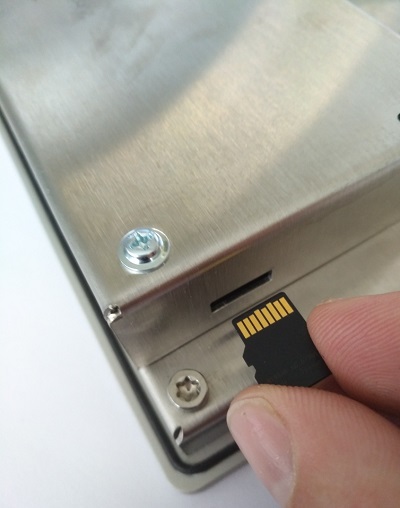
-
Power on the DeviceDevice boots up (20s), during this time the display is on and the Status LED is off Image will be restored, during this time the progress is visible on the display and the Status LED is blinkingAfter a while (2-4 Minutes) the display becomes succeed and the Status LED is onThe Image is now restored
-
Power off the Device
-
Remove micro SD card
-
Power on the Device
Remarks:
-
the green debug-led is placed on the right side of the battery.