
Introduction
There's usually one UART, that is used as a debug and control interface to connect with terminal application on a PC via a Micro-USB header
To connect with the debug-interface you can use terminal applications like TeraTerm (Windows), GtkTerm (Linux with GUI), screen (Linux shell) or the like. Set your terminal to 115200 baud 8N1.
This connector allows the user access to the Debug Console and to communicate with the bootloader ard the operating system later on without the need for a network setup.
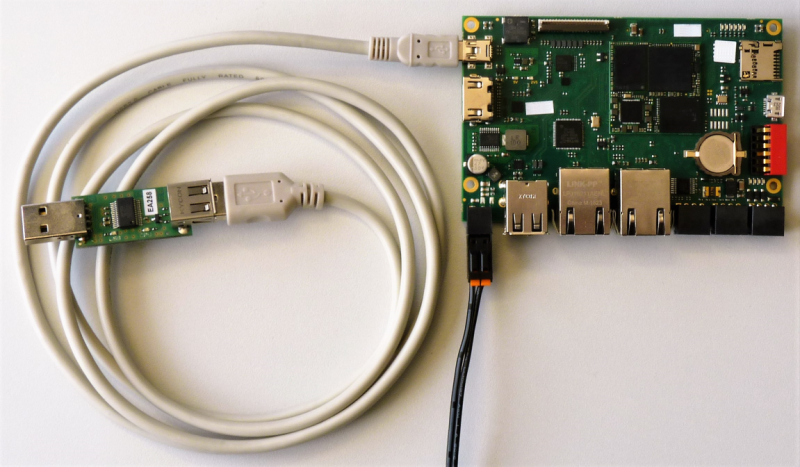
The USB-UART Debug Adapter can be ordered under the article number:
Art 45212 USB to UART Debug Adapter
First Start
Before turning on the power for the board, make sure the USB-to-Serial adapter is plugged into the computer and that you have a terminal or console program running on the COM port the USB-to-Serial adapter is registered at. In Linux this will usually be a ttyUSB and in Windows a COM port device.
Once this is set up, the board can be powered on and text should appear in the terminal program, which means the operating system is starting. After a short wait the text output should stop and a login prompt is visible. The image below shows an example what should be shown in the terminal program. The login prompt is right at the end of the screen.
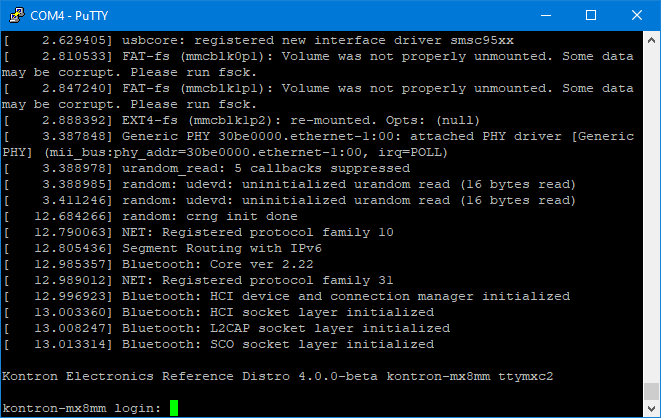
To log in use the user root and the default passowrd root is needed. Once logged in all bootloader and linux commands can bes executed.
To log into the bootloader type any key while booting the baord.